Geekvape atomizer short, the fixes in the right order
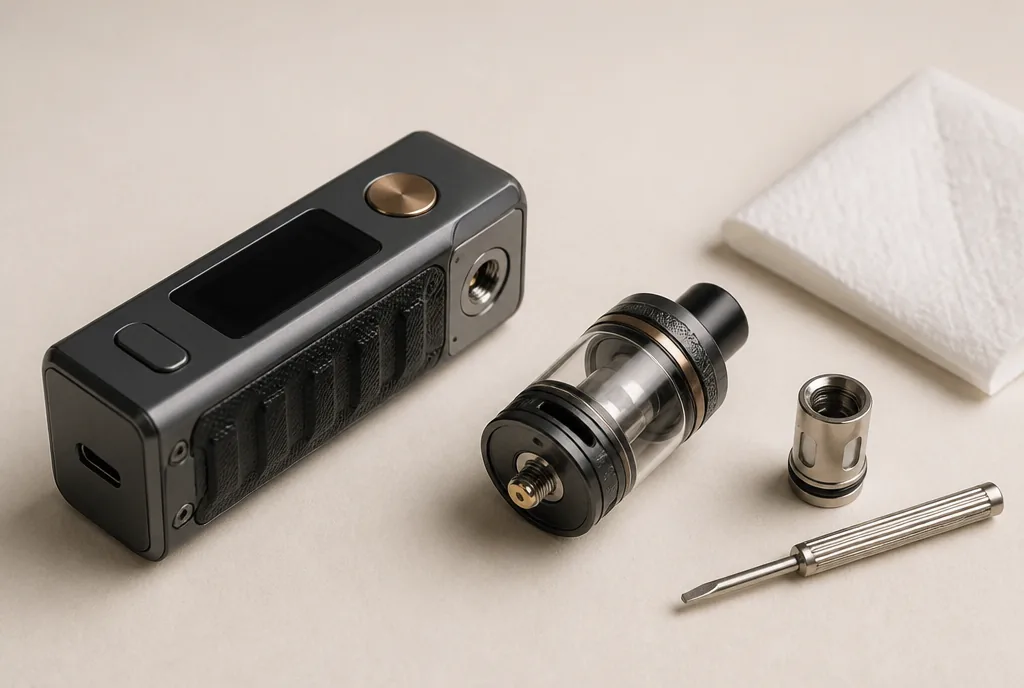
Your Geekvape mod flashes “Atomizer Short” and the fire button stops doing anything. The temptation is to press again, tighten the tank harder or start browsing for a new mod. All three are the wrong reflex. A Geekvape atomizer short is often sorted in a few minutes, provided you work in a set order, from the most harmless check to the most final one, and know the point at which the mod itself becomes the suspect.
Geekvape atomizer short, what the mod is telling you
A Geekvape atomizer short means the mod has detected a short circuit at the atomiser. As a safety measure it switches into protection and refuses to heat the coil. The most common culprit is the coil itself, worn, badly seated or incompatible. After that come a dirty 510 connection, a tank screwed on badly or damaged threads.
The short answer comes down to four checks, carried out in order. Clean and refit, inspect the coil, look at the 510 pin, then try another atomiser. If two atomisers that work elsewhere trigger the same message on your mod, the fault lies with the mod. That is the moment to stop and go back to the retailer.
Short, low, no atomizer, four messages not to confuse
Mods display several related alerts, and each one calls for a different response. On the Aegis Legend 2 (L200), for instance, “Atomizer Short” points to a short circuit at the coil and “No Atomizer” to no coil being detected at all.
| Message | What the mod has found | First reflex |
|---|---|---|
| Atomizer short | A short circuit, firing is blocked | Clean, refit, inspect the coil |
| Atomizer low | A coil resistance too low for the accepted range | Check the value and compatibility of the coil |
| No atomizer | No coil detected | Check the coil is seated and the thread is clean |
| Check atomizer | Wording varies by brand, sometimes for the same fault | Follow the same method as for a short |
The distinction matters. An atomizer low does not report an abnormal contact, only a value too low for the mod. It is solved by changing the coil, not by taking the connector apart.
The order of checks, from simplest to most final
Each step takes a minute or two. The point of the order is to rule out whatever costs nothing first, and to leave the 510 pin until last. Switch the mod off before you start.
First check, clean the connection and refit without forcing
Unscrew the tank, then wipe the mod’s 510 plate and thread with kitchen roll or a dry cloth. A drop of e-liquid or a little residue is enough to disturb the contact between mod and atomiser.
Screw it back on until you feel light resistance, and no further. Too loose and the contact becomes unstable. Too tight and the tank eventually pushes the pin down and marks the thread.
Second check, inspect the coil
Take the coil out, look at its base and seal, then refit it properly. For Z Series coils, Geekvape asks for the head to be pressed in firmly, since a loose fit can cause poor contact or even damage the part.
The cotton tells you how worn it is. Slightly yellowed, it still leaves the coil some life. Brown, it marks the end. If the message persists, fit a new coil that is compatible with your tank.
Third check, look at the 510 pin
Screwing a tank on too hard eventually pushes the mod’s centre pin down, so that it no longer meets the atomiser properly. Some 510 pins can be raised slightly with a small flat screwdriver.
This is a delicate job, to be done with the mod switched off and the battery taken out if it is removable, in small movements. If in doubt, leave it to the retailer. A forced or bent pin turns a minor fault into a repair.
Fourth check, the cross-test that isolates the mod
Geekvape itself recommends, in its FAQ, trying an atomiser you know works on another mod. The test works both ways. An atomiser that fires elsewhere but triggers the message on your mod points to the mod. Conversely, a tank that shows the error on every mod points to the tank, or to its coil.
The stopping rule follows from that test. When two different atomisers, both working on another device, each trigger the message on your mod, there is no point going further, the fault is electronic.
Z Series coils, the settings that prevent a Geekvape atomizer short
The message sometimes appears straight after a coil change. The manufacturer’s page for the Z XM coils (Boost version) gives power ranges and a few fitting instructions worth following.
| Z XM coil | Power recommended by Geekvape |
|---|---|
| 0.15 Ω | 70 to 85 W |
| 0.2 Ω | 70 to 80 W |
| 0.4 Ω | 50 to 60 W |
The manufacturer advises filling the tank before fitting the coil, then waiting three to five minutes for the cotton to soak through. Check too that the mod has picked up the new value and that the wattage you have set falls within the coil’s range.
A reading slightly off the nominal value is not a fault. A variation of around 0.05 Ω is considered normal once a coil has been primed. A 0.2 Ω Z coil showing 0.18 Ω is therefore working as intended, and that figure should not be mistaken for a Geekvape atomizer short.
When to change the coil so the message stays away
A worn coil remains the first cause of a Geekvape atomizer short. The manufacturer puts the life of a Z XM coil (Boost version) at 50 to 60 ml of e-liquid. In the UK, where refillable tanks are capped at 2 ml, that works out at 25 to 30 fills. Retailers tend to think in weeks instead, somewhere between two and four.
That span shrinks with very sweet or heavily flavoured e-liquids, which clog the cotton faster. The ratio matters too, and our note on the 70/30 ratio covers what a VG-rich liquid changes for coil upkeep.
A burnt taste or a flat flavour signals the change before the error message does. Replacing the coil at that stage beats waiting for the mod to reject it. On a sub ohm tank, choosing your base liquid according to the coil follows the same logic.
UK rules also cap nicotine e-liquid at 20 mg/ml in 10 ml bottles. That limit has no bearing on the diagnosis, but anyone mixing their own liquid will find the arithmetic set out in our guide to the nicotine salt shot.
What not to do when the message appears
Pressing the button again achieves nothing, since the protection blocks firing for as long as the abnormal contact remains. Tightening harder does not help either. It is in fact one of the causes, because overtightening pushes the pin down and damages the thread.
A coil that keeps triggering the message goes in the bin rather than being retried over and over. Better to sacrifice a doubtful coil than take the slightest risk with a battery-powered device.
One last point, and it is not negotiable. If the mod gets unusually hot, gives off an odd smell or changes shape, stop using it, remove the battery if it is removable and contact your retailer.
FAQ
Five questions come up regularly once the basic checks are done, covering pod kits, batteries and what the brand asks for.
Can a brand new coil trigger the message?
Yes. A coil straight out of the box can be badly seated, faulty or unsuited to the tank. Before suspecting the mod, try a second one of the same reference.
Can the message come from the battery?
The message concerns the atomiser, not the battery. If the screen shows a battery warning at the same time, though, test with a charged battery or another compatible one before taking anything apart.
Do Geekvape pod kits show atomizer short too?
Not necessarily under that name. On the Aegis Hero Q, the manual lists “No Pod” when no cartridge is detected or when the seal on a new pod has not been torn off, and “Check Pod” when it is badly fitted. The fix is to reinstall it, try another cartridge or wipe condensation off the contacts.
The message comes and goes, what does that mean?
A fault that appears and disappears points to an unstable contact more than a dead coil. Inspect the insulating seals at the base of the coil and the tank, which keep positive and negative apart, and replace the damaged part if the fault repeats.
What does Geekvape ask for before handling a claim?
The manufacturer asks for a video showing that the same atomiser works on other mods and that at least two atomisers fail on the device in question. Go through your retailer first, who will know the procedure.
Geekvape atomizer short, the order before the replacement
An error message is not the end of your kit. Clean connection and measured tightening, coil checked or replaced, 510 pin examined with care, then the cross-test. That last step settles whether you are dealing with a tired consumable or a mod that needs looking at.
Faced with a Geekvape atomizer short, method matters more than tools. Kitchen roll, a spare coil and a second atomiser are often enough to reach a verdict. Understanding what your hardware is telling you remains the best way to make it last, whatever the brand.
Editorial content for adult readers only. Vaping products are not for sale to anyone under 18 in the UK. Nicotine is a highly addictive substance. This article is not a buying recommendation.
You might also like
Small problems

Nicotine salt shot: dosage and how to use it
A nicotine salt shot is 20 mg/ml in 10 ml. Working out the final strength, the pouring order, and the mistakes that ruin a whole shortfill.
01Morgane Trémaux · Lire l'astuce
Smart maintenance

Argus G2, care tips to make each pod last longer
Argus G2 care in practical tips. Priming a new pod, choosing a suitable e-liquid, cleaning the contacts and spotting when a Voopoo pod needs replacing.
02Morgane Trémaux · Lire l'astuce
Quick tips
Vaporesso Armour GS, the user guide in quick tips
Vaporesso Armour GS user guide in simple steps. Clicks, menu, Pulse and Eco modes, the two locks, GTX coils and the protections that cut power.
03Morgane Trémaux · Lire l'astuce